



A quick solution to resize your images
If you need to redimension images, whether to adapt them to a size that is suitable for a web page or to send them by email or for any other purpose, you'll be forced to use one of the existing image editors. For very precise projects, where we have to perform other adjustments, these applications can be very useful. But, if it's simply changing the image's size, they can be somewhat cumbersome and slow.
Microsoft's tool to resize images
Microsoft puts within our reach one of the small utilities, known as PowerToys, to make the image redimensioning process easier: Image Resizer. With this tool you'll be able to transform them to the size of your choice with a simple click of the mouse.
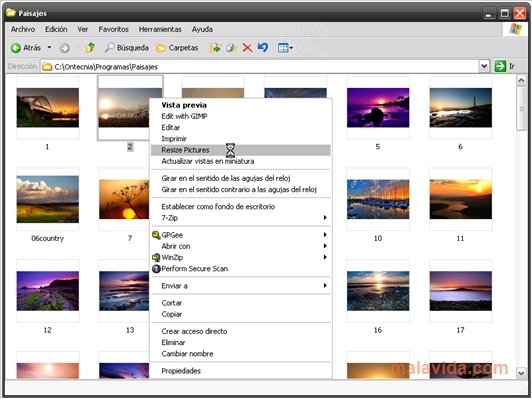
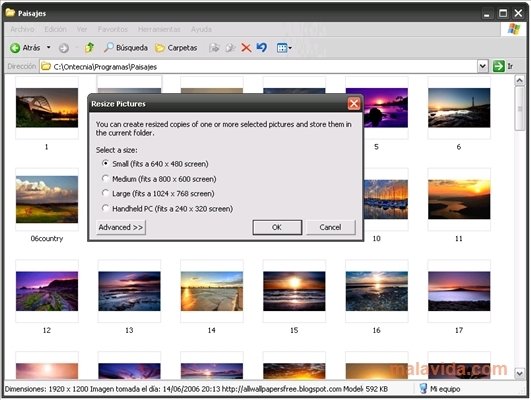
Yo use Image Resizer, all we have to do is select the image that we want to modify and right-click on it. In the contextual menu, we have to select Resize Pictures. After that, we have to choose one of the preset sizes that the application offers or input a customized size.
By default, the application creates a copy to the size that you have chosen of the original image, even though it offers you the possibility to overwrite the redimensioned images. Take Image Resizer into account when it comes to redimensioning images!
 Vanessa Martín
¡Hi! I am Vanessa Martin, I like to travel, music, photography, and I am passionate about the Internet, as it is a great source of information where you can find everything you need. If it exists, it is on the Internet. Another of my great...

Antony Peel